🎯 By the end of this lesson you can…
- Explain what a computer is in one simple sentence
- Name the three things every computer does: input, process, output
- Give real examples of input and output devices
- Explain why a computer needs precise instructions
Computers are everywhere
Your phone, a TV remote with a screen, a supermarket checkout, a car’s dashboard, a game console, even some fridges — they all have a computer inside. They look very different, but they all do the same three things.
A machine that takes in information, follows a list of instructions to work on it, and gives back a result.
🍎 A super-fast kitchen helper who follows recipes perfectly — but only if the recipe is written exactly right.
The three jobs of every computer
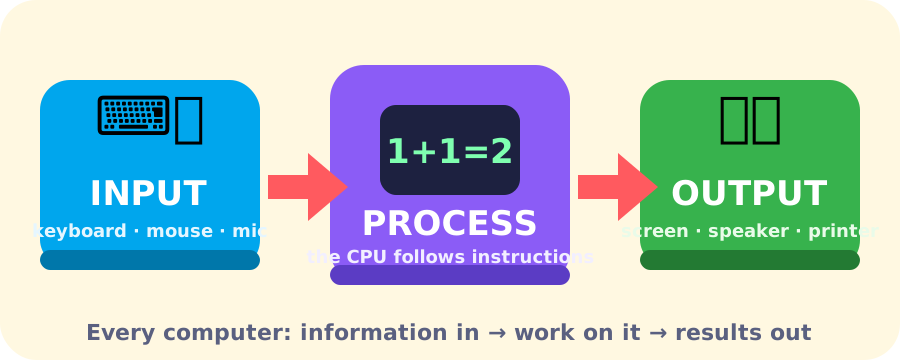
- Input — information going in: typing on a keyboard, tapping a screen, speaking into a microphone, scanning a barcode.
- Process — the computer works on the information by following instructions: adding, comparing, sorting, searching.
- Output — results coming out: text on a screen, sound from a speaker, a printed receipt.
Fast, tireless… and not clever
A computer can do billions of simple steps every second without ever getting tired or bored. But here’s the surprising part: a computer doesn’t understand anything. It can’t guess what you meant. It just follows its instructions, exactly, one after another.
That’s why learning to program is really learning to write precise instructions. In LearnWith, we write those instructions in a simple English-style language called pseudocode. Here’s a sneak peek — a tiny program that shows input, process and output. Tap each line, then press Run!
1BEGIN2 TAKE PRICE, QUANTITY3 SET TOTAL = PRICE * QUANTITY4 DISPLAY TOTAL5ENDCheck your understanding
1BEGIN2 TAKE PRICE, QUANTITY3 SET TOTAL = PRICE * QUANTITY4 DISPLAY TOTAL5END📌 Key takeaways
- A computer is a machine that follows instructions to turn input into output.
- Input → Process → Output describes every computer, from a phone to a cash machine.
- Computers are fast and never get bored — but they never guess what you meant.
- Because computers follow instructions exactly, our instructions must be precise.
Finished reading & practising?
Saved in this browser. Create a free account to keep it forever.