🎯 By the end of this lesson you can…
- Explain what a program is
- Compare a program to a recipe
- Explain why the order of instructions matters
- Read a short program and say what it does
A recipe for a computer
Think of your favourite recipe. It lists steps in order: mix this, add that, bake for 12 minutes. If you follow the steps, you get cookies. 🍪
A program is exactly that — but for a computer. It is a list of instructions that the computer follows, in order, to get a result.
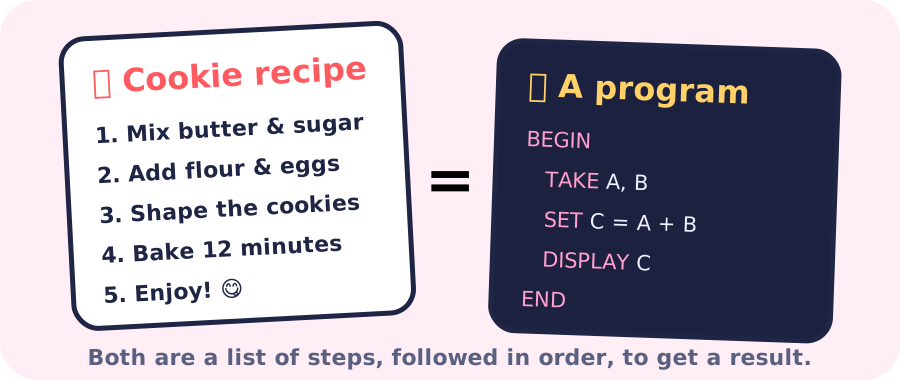
A list of instructions, written in order, that tells a computer what to do.
1BEGIN2 DISPLAY "Hello!"3END🍎 A recipe card: follow the steps, get the dish.
One step at a time, top to bottom
A computer runs a program one instruction at a time, starting at the top and moving down. It never skips ahead and never jumps back on its own (later you’ll learn instructions that tell it to repeat or choose).
1BEGIN2 DISPLAY "Good morning!"3 DISPLAY "Time for school."4 DISPLAY "Have a great day!"5ENDOrder matters
Here are the same four steps for getting dressed, in two different orders. Which one works?
| Order A | Order B |
|---|---|
| 1. Put on socks | 1. Put on shoes |
| 2. Put on shoes | 2. Put on socks |
| 3. Tie laces | 3. Tie laces |
Order A works. Order B puts socks on over your shoes! 😂 Programs are the same: the right steps in the wrong order give the wrong result.
Run the program in your head, one line at a time. Fill every empty box, then press Check.
1BEGIN2 SET SCORE = 03 SET SCORE = SCORE + 104 SET SCORE = SCORE + 55 DISPLAY SCORE6ENDCheck your understanding
1BEGIN2 DISPLAY "C"3 DISPLAY "B"4 DISPLAY "A"5END1BEGIN2 DISPLAY "Go!"3 DISPLAY "Ready"4 DISPLAY "Set"5END📌 Key takeaways
- A program is an ordered list of instructions for a computer.
- Like a recipe, the steps must be clear and in the right order.
- The computer runs the instructions one at a time, from top to bottom.
- Changing the order of steps can change the result — or break it.
Finished reading & practising?
Saved in this browser. Create a free account to keep it forever.